< | Help Index | >

|
Switch Bounce Measurement |
How Bounce Is Measured
The Mistral Keypad Test System is capable of measuring the contact bounce of a membrane switch. A simplified circuit diagram is shown below.
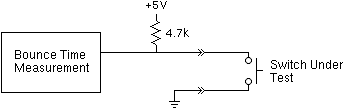
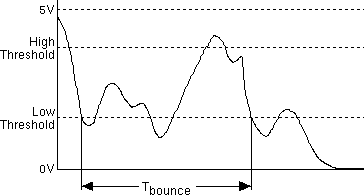
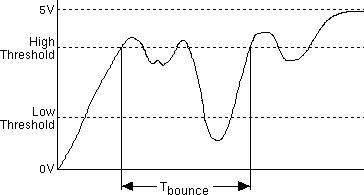
Contact bounce is measured when the key is pressed and again when it is released. The bounce time for each action is defined as shown in the diagrams below.
|
|
Key Press Bounce |
|
|
Key Release Bounce |
The Mistral can measure bounce times, Tbounce, from 0.1mS to 250mS. The High Threshold and Low Threshold range is 0V to 5V.
Setting Up Switch Bounce Measurement
The parameters used during switch bounce testing are set in the Keypad File's Edit Info window. "Number of switch presses per test" is the number of additional times a key must be pressed for the bounce test. Below this are the maximum bounce times allowed for switch down and switch up.
The Bounce Thresholds section lets you choose from standard voltage thresholds or set custom thresholds between 0 and 5 Volts.
Measuring Switch Bounce
To measure switch bounce while testing, select "Test Switch Bounce" from the "File" menu while in Production Test mode. This can be turned on and off at any time while testing. Note: Bounce testing can't be performed during Life Cycle Testing or when a Keypad File contains Groups.
When "Test Switch Bounce" is checked, after a switch is pressed and the resistance is good, a small window will pop up beside the switch item and you will be prompted to press the switch again. Each time you press the switch the bounce down and bounce up times will be displayed in the small window. After the key is pressed the number of times set in the Edit Info, the average and maximum bounce down and bounce up times will be displayed. If the maximum down or up time exceeds the values set in the Edit Info window, the item will turn red. If the bounce times are ok, the item will turn green. You can test the switch again or press another switch to test its resistance and bounce times.
To cancel the bounce testing of a switch, click on the small window, another item or one of the job control buttons on the left side of the main window.
To look at the bounce times of a switch that has already been bounce tested, click on the switch item.
Bounce times can be saved in the Job Log if the detailed log format is selected. See Finishing The Job And Logging The Results for more information on Jog Logs.
< | Help Index | >